How to Power Remote Work on a Sailboat (Battery, Solar & Setup Guide)
- ericaoliviasilva24
- Mar 3
- 4 min read
Updated: Apr 29
This article may contain affiliate links. If you purchase through them we may earn a small commission at no extra cost to you.

Why Reliable Power Matters for Remote Work
Working remotely from a sailboat might sound complicated, but with the right setup it’s surprisingly achievable. Reliable power and internet are the two things that make it possible to run a business or freelance career while living at anchor.
In this article we share how we power remote work aboard our 44-ft Kelly Peterson sailboat, including our battery setup, charging systems, and the tools that keep us connected. Power and internet are actually two of the biggest hidden drivers behind the real cost of living on a boat in the UK — especially once you start working full-time from onboard.
⚡ How do you power remote work on a sailboat?
To work remotely from a sailboat, you need a reliable power setup that usually includes:
A battery bank (lithium or lead acid)
A way to recharge (engine, solar, or shore power)
An inverter to run laptops and devices
A stable internet connection (Starlink or hotspot)
On our boat, we use a mix of batteries, charging systems, and backup options to keep working full-time while at anchor.

🔌 What we actually use on our boat
Our setup is built around keeping things simple but reliable enough to work full-time.
Right now, we’re using:
LiFePO4 lithium battery bank
DC-to-DC charger for safe charging from the engine
Inverter to run laptops and devices
Starlink for internet
Shore power when available
We’ve gradually upgraded over time, and this setup gives us enough power to work comfortably without constantly worrying about battery levels. If you’re trying to figure out what a full liveaboard setup actually looks like in practice, we break down our wider boat systems and essentials here.

Our system uses LiFePO4 lithium batteries which are now very common in liveaboard electrical setups.
Lithium vs Lead Acid (what we learned)
We originally had lead acid batteries, but upgrading to lithium made a big difference.
Lithium batteries:
last longer
charge faster
allow deeper use without damage
They are more expensive upfront, but for us, the extra usable power and reliability made them worth it — especially working remotely. Battery choice ends up being one of the biggest decisions in a liveaboard electrical system, especially if you’re also factoring in solar and charging setups.

Charging the Batteries
Right now our main way of charging the batteries is through the engine via a DC-to-DC charger. When the engine runs, it charges the house battery bank.
This works well when we’re moving between anchorages, but it’s not ideal if we stay anchored in one place for long periods. Running the engine purely to generate electricity is noisy, inefficient, and burns fuel.
Our charging setup includes a DC-to-DC charger, which allows the engine alternator to safely charge the lithium battery bank.

Solar Power (Onboard Setup)
We run a 780W 12V solar system, which forms the main part of our charging setup while at anchor.
The system includes:
4 × 195W bifacial solar panels (780W total)
2 × Victron SmartSolar MPPT controllers
Panels wired in parallel across two separate arrays
Marine-grade fusing and isolation switches
This setup is designed to support full-time liveaboard use, including remote work and daily onboard power demands. Each MPPT controller manages two panels, which improves reliability and allows the system to continue producing power even if one array is shaded or underperforming.
In typical UK cruising conditions, this setup is enough to maintain our batteries without needing to run the engine regularly or rely heavily on shore power.
Our Remote Work Setup
Working remotely from a boat requires surprisingly little power, but reliability is essential. My main work computer is actually a Mac Mini, which lives permanently aboard the boat. While many digital nomads work from laptops, I prefer using a full desktop setup for design work and presentations.
Compared to appliances like fridges or watermakers, computers themselves use relatively little electricity. We actually broke down our full power setup in more detail here, including how we run everything onboard day-to-day without shore power.
Internet at Anchor
Reliable internet is essential for remote work. We currently use Starlink, which has been a game-changer for working from the boat. It allows us to work from anchorages where mobile signal would normally be unreliable. Starlink does use a noticeable amount of power, so it’s an important factor when planning an electrical system for remote work afloat.
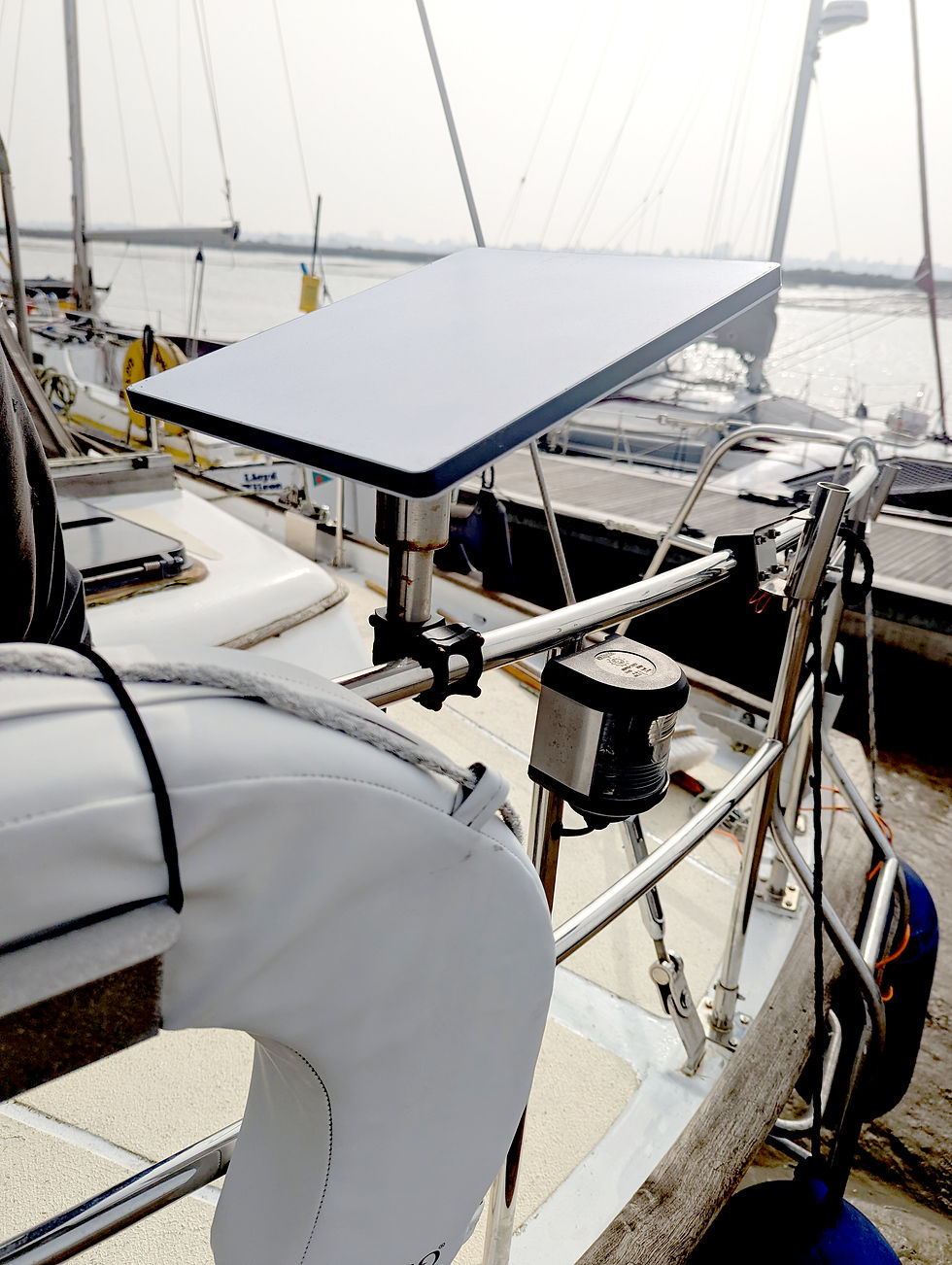
If you're thinking about working remotely from a boat, you can get a FREE month of Starlink using our referral link below.
We currently rely on Starlink for internet aboard, which makes remote work possible even in fairly remote anchorages.
We use the Starlink Mini, which is more than powerful enough for my freelance graphic design work. I’m often downloading large design files and having Zoom calls with clients, so reliable internet is essential.
Our Typical Daily Power Use
In a typical workday aboard we run:
the iMac for work
phone charging
dehumidifiers
Compared to larger electrical loads like fridges, heaters, or watermakers, the work setup itself uses a relatively small portion of our battery capacity.
The real challenge isn’t powering a computer — it’s making sure the entire electrical system can keep everything running comfortably while anchored.

Results
The system reliably supports our daily onboard power needs while living and working at anchor. In typical UK conditions, it provides enough energy to run laptops, internet, lighting, and other essential systems without needing constant engine charging or regular shore power.
The main benefit isn’t just total output — it’s consistency. Having dedicated solar means we’re no longer managing power hour-to-hour, which makes remote work and daily life onboard much simpler.
From a cost perspective, the full setup came in at roughly:
Solar panels: £800–£1,000
MPPT controllers: £300–£500 each
Mounting, cabling, fusing, and hardware: £300–£600
Total system cost: approximately £1,800–£3,000
This kind of setup also has a direct impact on overall running costs, especially when you factor it into the wider picture of life afloat. We break that down in more detail in our full guide to the cost of living on a sailboat in the UK.
Overall, it’s made the boat significantly more self-sufficient and reduced reliance on fuel and shore power.


Comments