Best Internet Options for Boats: Why We Chose Starlink for UK Liveaboard Life
Updated: Apr 27
This post contains affiliate and referral links. If you click a link and make a purchase or sign up for a service, I may receive a small commission or account credit at no extra cost to you. This helps keep the blog running and Luna well-fed!

Reliable internet isn’t just a "nice-to-have" for us—it’s the reason we can live this life. As a remote worker living on a 44ft sailboat, "no signal" isn't just an inconvenience; it’s a career hazard.
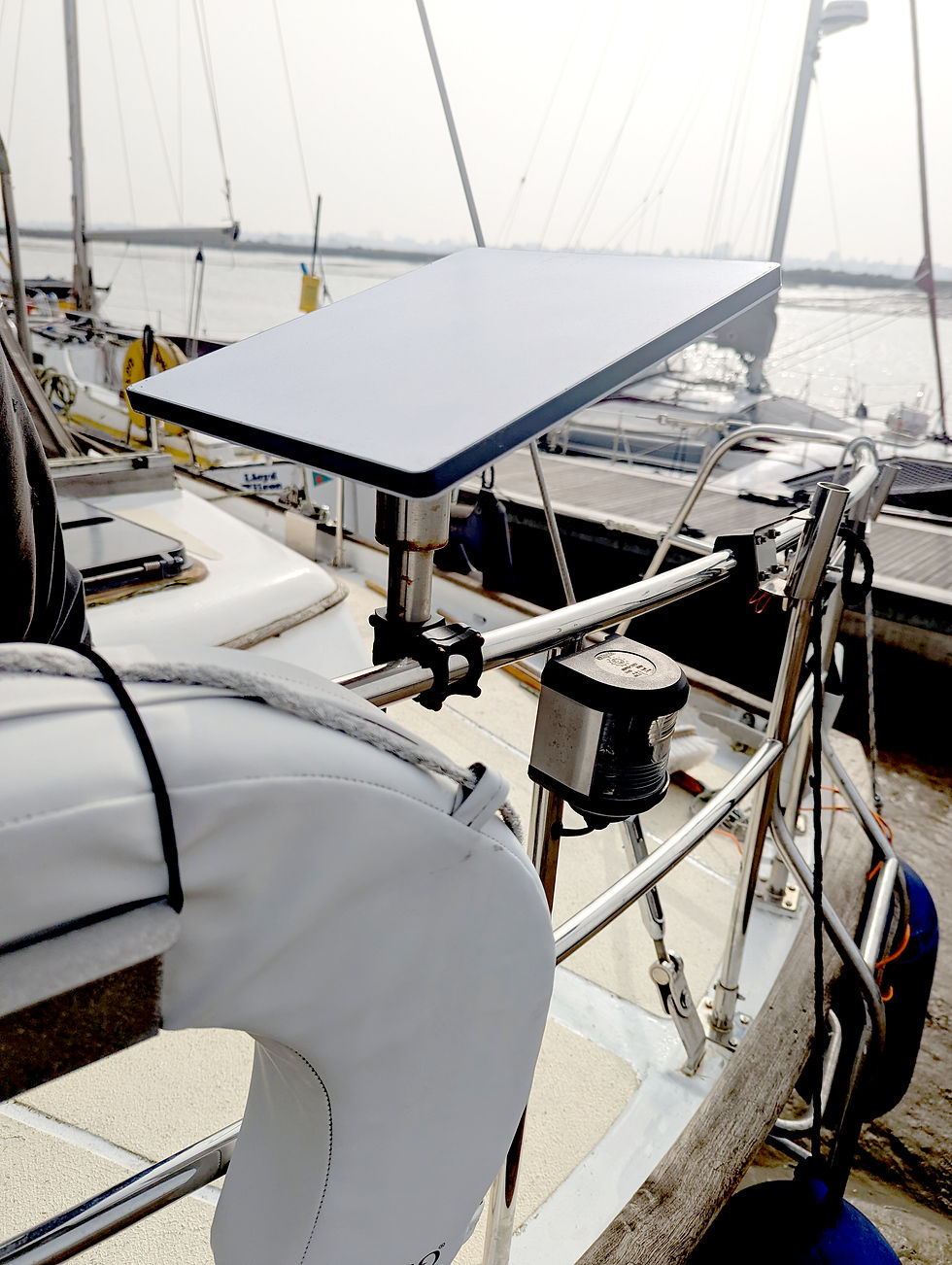
When we first moved aboard, I spent hours researching the best ways to stay connected. I looked into 5G routers, external antennas, and different SIM setups. But in the end, we went with Starlink. Starlink for Boats: 1 Year Review
If you’re trying to figure out how to get Wi-Fi on a boat in the UK (or while hopping across the channel), here is the honest truth about the options, the costs, and why we eventually put a "space dish" on our deck.
The Competition: 5G Routers vs. Satellite
Before we committed to the £96/month Starlink price tag, we looked at the traditional route: 5G Marine Internet.
5G / LTE (The "Budget" Option)
Most boaters use a 5G router (like a Teltonika) paired with an external antenna on the mast.
The Pros: It’s much cheaper (£20–£30/month) and uses very little power.
The Cons: You are at the mercy of land-based towers. If you’re in a remote Cornish cove or a few miles offshore, your Zoom call is going to drop.
Starlink (The "Game Changer")
Starlink uses low-orbit satellites, meaning as long as you have a clear view of the sky, you have fast, reliable internet — enough for video calls, large uploads, and normal day-to-day work.
Why We Chose Starlink
After looking at the "no context" specs for 5G, we realized that for our lifestyle, Starlink was the only real choice. Here’s why:
Work Consistency: I need to know that when I log on at 9:00 AM, the internet works. Starlink delivers speeds of 150Mbps+ consistently, even in the middle of nowhere.
Freedom of Movement: We don't have to check "mobile signal maps" before choosing an anchorage.
Simplicity: One dish, one cable, one app.
However, it wasn’t all smooth sailing. Starlink is one of those Hidden Costs of Living on a Boat that people often underestimate. Between the hardware cost and the monthly subscription, it’s a significant investment.
The Big "Boat Life" Catch: Managing the Power Draw
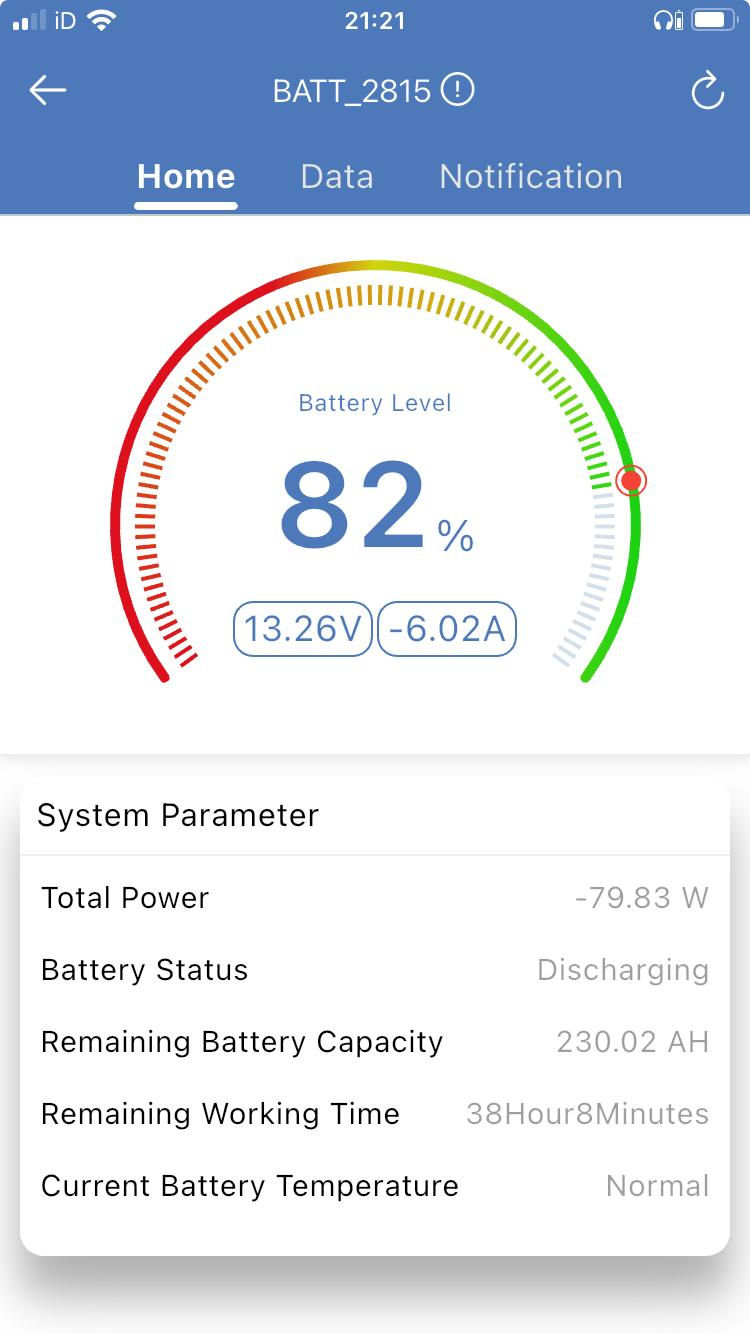
This is the part the Starlink website won’t fully explain for boaters. While the older, standard Starlink dishes are notorious "power hogs" (drawing 50–75W+), we opted for the Starlink Mini, and it has been a total win for our battery bank.
In our experience, the Starlink Mini is incredibly efficient. While the official specs say it can draw up to 60W at peak, we’ve found that in reality—once it’s locked onto a satellite and just "idling" or doing standard browsing—it draws much closer to 20–35W.
Even though it’s "low power" compared to the big dishes, on a boat, every Amp still matters. If you leave it running 24/7, that’s still roughly 40-60 Amp-hours out of your batteries every day.
Because we wanted the freedom to leave the internet on without stressing, our setup was entirely dependent on our battery setup. We actually designed our DIY 780W Solar Installation to ensure we had enough overhead to run the Starlink Mini, charge our laptops, and keep the lights on even on those grey UK days. Without that solid solar foundation, we’d be much more precious about when we "plug in" to the outside world.

Life Offshore & The "Home Abroad" Problem
If you’re planning on sailing offshore or heading to the Channel Islands/Europe, there are two things you need to know:
Ocean Data: For coastal UK sailing, the "Regional Roam" plan is perfect. If you go way out to sea, you have to toggle on "Mobile Priority" data, which is pricier.
The VPN Trick: When you’re on Starlink, your IP address might show you as being in a different country. This can block UK banking or BBC iPlayer. We use a VPN to "pin" ourselves back to the UK so we can stay warm and watch our favourite shows (It’s one of those small things you only discover once you’re actually living aboard.)
Is It Worth It?
If you just want to check Facebook occasionally, Starlink is overkill. Stick to a 5G SIM card and a good antenna.
But if you work from your boat, Starlink is the best money we spend every month. It turned our sailboat from a "weekend hobby" into a fully functional floating office.
Quick Comparison Table
Feature | 5G Router Setup | Starlink (Regional) |
Monthly Cost | ~£25 | £96 |
Initial Gear Cost | ~£300-£500 | ~£300-£450 |
Speeds | Variable (10-50Mbps) | High (100-200Mbps) |
Power Usage | Very Low (5-10W) | High (50-75W) |
Reliability | Depends on signal | Excellent (Clear sky) |
💰 Get a Free Month of Starlink
If you’re thinking about taking the leap into boat life, you can get one month of service for free when you buy your kit through our referral link. It helps us keep the blog running (and Luna fed!) and saves you £96 on your first bill.
Final Thoughts
Internet on a boat in 2026 is better than it’s ever been, but it requires planning. Make sure your battery bank can handle the draw, get a good mounting system for your dish, and enjoy the freedom of taking your office to the most beautiful views in the UK.
If you're setting up internet on a boat:
Have questions about our Starlink mount or how it handles the rain? Drop a comment below!


Comments